---
title: "Emails: Using HTML Element in Emails"
description: The HTML element enables you to create customized emails using HTML, allowing for tailored text, links, tables, and formatting options like spacing, font color, and size. It offers greater customization compared to the Text element. Additional resources can provide further guidance on common HTML elements.
---
[Skip to content](https://support.enrollnow.io/en/knowledge-base/html-element-in-emails-overview#main-content)
[EnrollNow Support Center](https://support.enrollnow.io/helpdesk?hsLang=en)

- [Support Center](https://support.enrollnow.io/helpdesk)
- [User Community](https://academy.enrollnow.io/)
- [Learning Academy](https://academy.enrollnow.io/)
- [Knowledge Base](https://support.enrollnow.io/en/knowledge-base)
Open main navigation
Close main navigation
- [Support Center](https://support.enrollnow.io/helpdesk)
- [User Community](https://academy.enrollnow.io/)
- [Learning Academy](https://academy.enrollnow.io/)
- [Knowledge Base](https://support.enrollnow.io/en/knowledge-base)
- [EnrollNow Support Center](https://support.enrollnow.io/helpdesk)
How can we help you?
- There are no suggestions because the search field is empty.
1. [EnrollNow Knowledge Base](https://support.enrollnow.io/en/knowledge-base?hsLang=en)
2. [Study Settings](https://support.enrollnow.io/en/knowledge-base/study-settings?hsLang=en)
3. [Email and Texts](https://support.enrollnow.io/en/knowledge-base/study-settings?hsLang=en#email-and-texts)
July 20, 2026
# Emails: Using HTML Element in Emails
The HTML element enables you to create customized emails using HTML, allowing for tailored text, links, tables, and formatting options like spacing, font color, and size. It offers greater customization compared to the Text element. [Additional resources](https://21554971.hs-sites.com/en/knowledge-base/using-html-elements-to-your-survey?hsLang=en) can provide further guidance on common HTML elements. 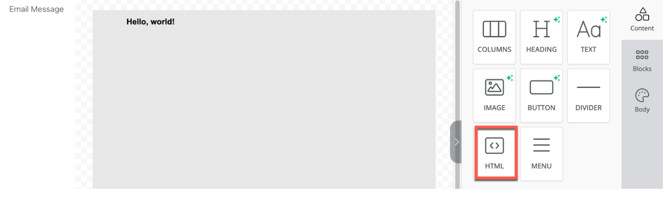
### Adding the HTML Element to Your Template
To insert the HTML element into your email template:
1. Navigate to the **Content** section.
2. Click on the **HTML** icon.
3. Drag and drop it onto the email body.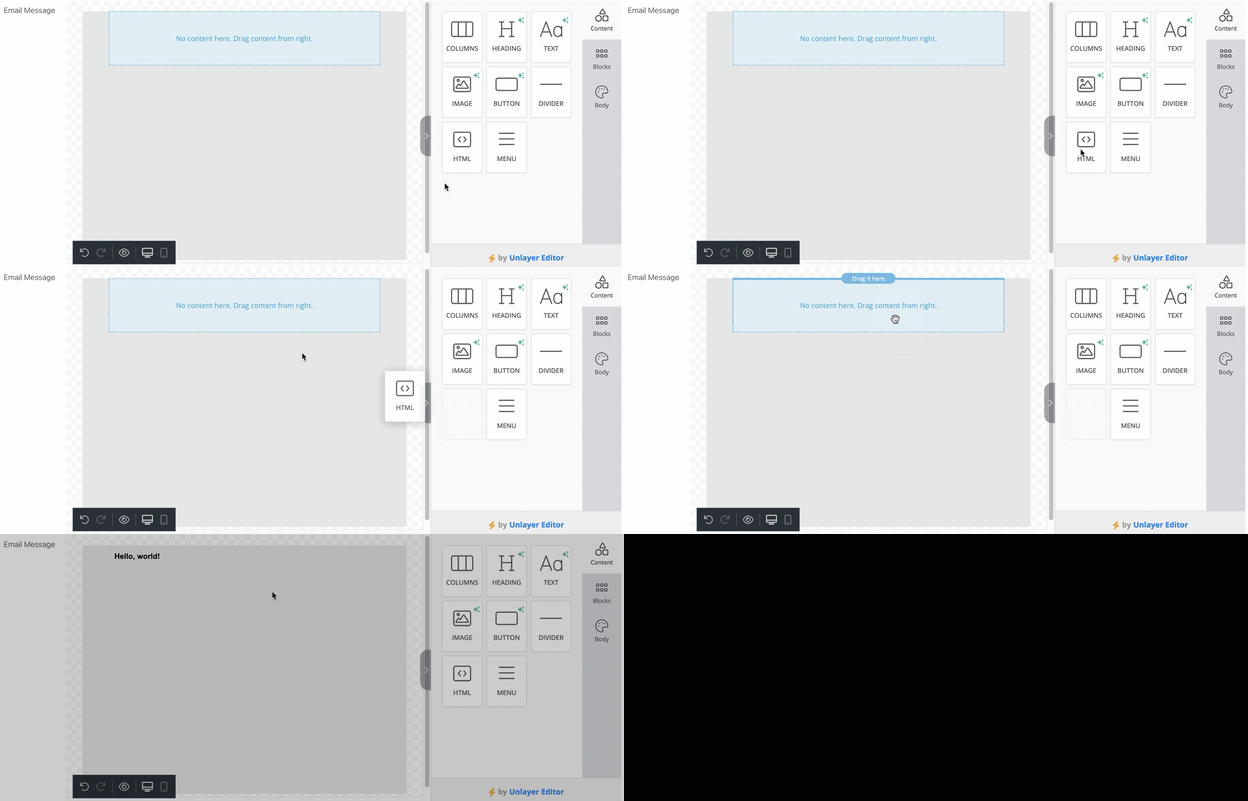
### Functions of the HTML Element
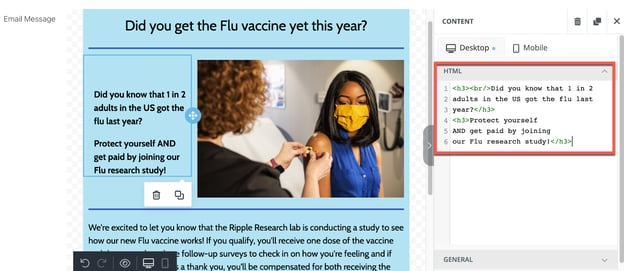
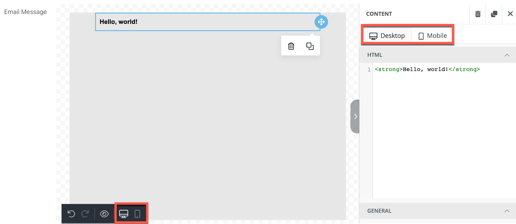
- **Customization Modes**: You can customize the HTML element in **Desktop** or **Mobile** mode.
- **Desktop Mode**: Provides full styling options, including the ability to write and edit HTML.
- **Mobile Mode**: Limited customization; does not allow direct HTML editing but enables modifications in the **General** and **Responsive Design** sections.
- **HTML Functionality**: The element enables email template creation using HTML, requiring proper HTML structure for correct formatting.
### **General Section of the HTML Element**
- **Padding Control**: Adjusts the spacing between the border of the HTML box and its content.
- **Customization**: Enables custom spacing to separate elements for better readability.
- **More Options**: By toggling the **"More Options"** button, you can individually set padding for the **top, right, left,** and **bottom** of the HTML box.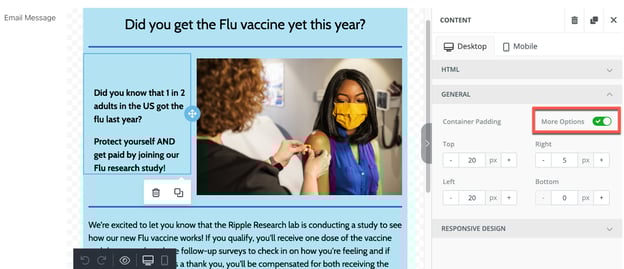
### **Responsive Design in the HTML Element**
- **Device Customization**: Ensures emails display correctly on different devices.
- **Visibility Control**: HTML elements can be **shown or hidden** on specific devices (desktop or mobile).
- **Editing for Devices**: Click the **desktop or mobile icon** or select the **Desktop/Mobile tab** at the bottom left of the editor to adjust settings.
- **Padding Adjustments**: Modify padding based on the recipient's device to optimize display.
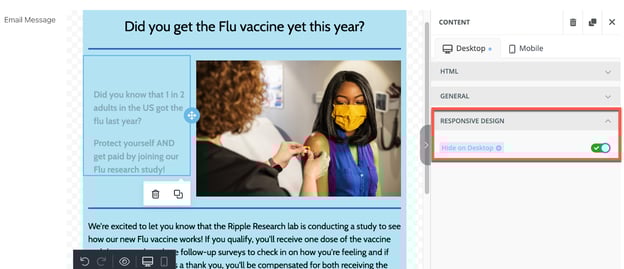
### **Hiding HTML**:
- - Toggle **"Hide on Desktop"** or **"Hide on Mobile"** to control visibility.
- Hidden elements will appear **faded** in the email editor but won’t be visible to recipients on the selected device.
- [My Account](https://support.enrollnow.io/en/knowledge-base/my-account?hsLang=en#main-content)
- [Customer Corner](https://support.enrollnow.io/en/knowledge-base/my-account?hsLang=en#customer-corner)
- [Support](https://support.enrollnow.io/en/knowledge-base/my-account?hsLang=en#support)
- [Users & Permissions](https://support.enrollnow.io/en/knowledge-base/users-permissions?hsLang=en)
- [Registry](https://support.enrollnow.io/en/knowledge-base/registry?hsLang=en)
- [Studies](https://support.enrollnow.io/en/knowledge-base/studies?hsLang=en)
- [Dashboard](https://support.enrollnow.io/en/knowledge-base/dashboard?hsLang=en)
- [Participants](https://support.enrollnow.io/en/knowledge-base/participants?hsLang=en#main-content)
- [Potential/Enrolled](https://support.enrollnow.io/en/knowledge-base/participants?hsLang=en#potential-enrolled)
- [Sex/Gender](https://support.enrollnow.io/en/knowledge-base/participants?hsLang=en#sex-gender)
- [Tasks](https://support.enrollnow.io/en/knowledge-base/tasks?hsLang=en#main-content)
- [Tasks](https://support.enrollnow.io/en/knowledge-base/tasks?hsLang=en#tasks)
- [Recruitment](https://support.enrollnow.io/en/knowledge-base/recruitment?hsLang=en#main-content)
- [Sources](https://support.enrollnow.io/en/knowledge-base/recruitment?hsLang=en#sources)
- [Strategies](https://support.enrollnow.io/en/knowledge-base/recruitment?hsLang=en#strategies)
- [Calendar](https://support.enrollnow.io/en/knowledge-base/calendar?hsLang=en)
- [Survey Creator](https://support.enrollnow.io/en/knowledge-base/survey-creator?hsLang=en#main-content)
- [Tips and Tricks](https://support.enrollnow.io/en/knowledge-base/survey-creator?hsLang=en#tips-and-tricks)
- [Thank you page](https://support.enrollnow.io/en/knowledge-base/survey-creator?hsLang=en#thank-you-page)
- [Question Types](https://support.enrollnow.io/en/knowledge-base/survey-creator?hsLang=en#question-types)
- [Report Builder & Reports](https://support.enrollnow.io/en/knowledge-base/report-builder-reports?hsLang=en#main-content)
- [Reports](https://support.enrollnow.io/en/knowledge-base/report-builder-reports?hsLang=en#reports)
- [Report Builder Basics](https://support.enrollnow.io/en/knowledge-base/report-builder-reports?hsLang=en#report-builder-basics)
- [Study Settings](https://support.enrollnow.io/en/knowledge-base/study-settings?hsLang=en#main-content)
- [Requirements](https://support.enrollnow.io/en/knowledge-base/study-settings?hsLang=en#requirements)
- [Email and Texts](https://support.enrollnow.io/en/knowledge-base/study-settings?hsLang=en#email-and-texts)
- [Display](https://support.enrollnow.io/en/knowledge-base/study-settings?hsLang=en#display)
- [Details](https://support.enrollnow.io/en/knowledge-base/study-settings?hsLang=en#details)
- [Statuses](https://support.enrollnow.io/en/knowledge-base/study-settings?hsLang=en#statuses)
- [Bulk Tasks](https://support.enrollnow.io/en/knowledge-base/study-settings?hsLang=en#bulk-tasks)
- [Events](https://support.enrollnow.io/en/knowledge-base/study-settings?hsLang=en#events)
- [Import/Export](https://support.enrollnow.io/en/knowledge-base/import-export?hsLang=en#main-content)
- [Tips and Tricks](https://support.enrollnow.io/en/knowledge-base/import-export?hsLang=en#tips-and-tricks)
- [study definitions](https://support.enrollnow.io/en/knowledge-base/import-export?hsLang=en#study-definitions)
- [Export](https://support.enrollnow.io/en/knowledge-base/import-export?hsLang=en#export)
- [API](https://support.enrollnow.io/en/knowledge-base/api?hsLang=en)
- [FAQs & Troubleshooting](https://support.enrollnow.io/en/knowledge-base/faqs-troubleshooting?hsLang=en#main-content)
- [Ripple Performance](https://support.enrollnow.io/en/knowledge-base/faqs-troubleshooting?hsLang=en#ripple-performance)
- [Security Settings](https://support.enrollnow.io/en/knowledge-base/faqs-troubleshooting?hsLang=en#security-settings)
- [Reuse Custom ID](https://support.enrollnow.io/en/knowledge-base/faqs-troubleshooting?hsLang=en#reuse-custom-id)
- [Internal Server Error - Importing](https://support.enrollnow.io/en/knowledge-base/faqs-troubleshooting?hsLang=en#internal-server-error-importing)
- [Account Lock out](https://support.enrollnow.io/en/knowledge-base/faqs-troubleshooting?hsLang=en#account-lock-out)
- [FAQ](https://support.enrollnow.io/en/knowledge-base/faqs-troubleshooting?hsLang=en#faq)
- [Calendar Integration Issues](https://support.enrollnow.io/en/knowledge-base/faqs-troubleshooting?hsLang=en#calendar-integration-issues)
- [e-consent downloads](https://support.enrollnow.io/en/knowledge-base/faqs-troubleshooting?hsLang=en#e-consent-downloads)
- [Support Web Pages](https://support.enrollnow.io/en/knowledge-base/faqs-troubleshooting?hsLang=en#support-web-pages)
- [EnrollNow Glossary](https://support.enrollnow.io/en/knowledge-base/faqs-troubleshooting?hsLang=en#enrollnow-glossary)
- [EnrollNow Performance](https://support.enrollnow.io/en/knowledge-base/faqs-troubleshooting?hsLang=en#enrollnow-performance)
- [Security](https://support.enrollnow.io/en/knowledge-base/security?hsLang=en#main-content)
- [Security](https://support.enrollnow.io/en/knowledge-base/security?hsLang=en#security)
- [Ripple Service Status Report](https://support.enrollnow.io/en/knowledge-base/security?hsLang=en#ripple-service-status-report)
- [Workflows and How To's](https://support.enrollnow.io/en/knowledge-base/workflows-and-how-tos?hsLang=en)
- [Site Admin](https://support.enrollnow.io/en/knowledge-base/site-admin?hsLang=en#main-content)
- [Users](https://support.enrollnow.io/en/knowledge-base/site-admin?hsLang=en#users)
- [Export](https://support.enrollnow.io/en/knowledge-base/site-admin?hsLang=en#export)
- [Security](https://support.enrollnow.io/en/knowledge-base/site-admin?hsLang=en#security)
- [Audit Logs](https://support.enrollnow.io/en/knowledge-base/audit-logs?hsLang=en)
- [Product Release Notes](https://support.enrollnow.io/en/knowledge-base/product-release-notes?hsLang=en#main-content)
- [2026](https://support.enrollnow.io/en/knowledge-base/product-release-notes?hsLang=en#2026)
- [2025](https://support.enrollnow.io/en/knowledge-base/product-release-notes?hsLang=en#2025)
- [2024](https://support.enrollnow.io/en/knowledge-base/product-release-notes?hsLang=en#2024)
- [2023](https://support.enrollnow.io/en/knowledge-base/product-release-notes?hsLang=en#2023)
- [2022](https://support.enrollnow.io/en/knowledge-base/product-release-notes?hsLang=en#2022)
- [2019-2021](https://support.enrollnow.io/en/knowledge-base/product-release-notes?hsLang=en#2019-2021)
[](http://enrollnow.io)
[Privacy Policy](https://enrollnow.io/legal/privacy-policy)[Terms of Service](https://enrollnow.io/legal/terms-of-service)
Copyright © 2025, EnrollNow