
The Comments Log in EnrollNow allows users to document, track, and manage communication and activity notes throughout the platform. Comments can be added in multiple areas of the application to help teams maintain accurate records and improve collaboration.
The Comments Log is available in areas including:
- Tasks
- Recruitment Sources and Strategies
- Potential Participants
- Enrolled Participants
While the available options may vary slightly depending on the section of the platform, the overall functionality of the Comments Log remains consistent throughout EnrollNow.
Comment Options
Contact
Selecting the Contact checkbox updates participant contact tracking information.
This automatically updates:
- The Study Date of Last Contact
- The Global Date of Last Contact associated with the participant profile
This option is commonly used when documenting participant outreach or communication attempts.
Pin Comment
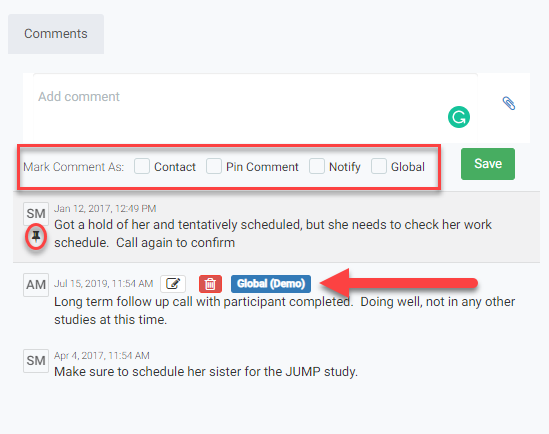
Selecting Pin Comment keeps the comment displayed at the top of the Comments Log for increased visibility.
Pinned comments:
- Display a thumbtack icon beneath the commenter’s initials
- Remain at the top of the log
- Are displayed in chronological order
- Allow multiple comments to be pinned simultaneously
This feature is helpful for highlighting important participant information, reminders, or ongoing study notes.
Notify
Selecting Notify sends an email notification to applicable team members to alert them about the comment.
This feature can be used to:
- Communicate urgent updates
- Notify staff of participant activity
- Improve team collaboration and follow-up
Global
Selecting Global makes the comment visible across all studies associated with the participant.
Global comments display:
- A Global tag
- The name of the study where the comment originated
For example:
Global (Demo)
This feature is useful for documenting participant information that should be visible to staff across multiple studies.
NOTES:
- Users can only edit comments they have made.: Comments by other users cannot be edited or altered.
- Hover Feature: Hovering over the initials of the commenter reveals their full name (first and last).