
If a participant should no longer be associated with a specific study, EnrollNow allows authorized users to remove that participant from the study.
Removing a participant will delete only the study-specific record and activity for that study. The participant’s GLOBAL profile and Registry data will remain intact unless removed separately.
Before You Begin
Before removing a participant, please review the following:
- This action removes the participant from one study only
- The participant’s GLOBAL profile remains in the Registry
- Study-specific data (forms, status history, and activity) for that study will no longer be accessible after removal
- Confirm the participant no longer needs to remain in the study before proceeding
Permissions Required
This action is ONLY available to users with appropriate study-level permissions, such as a Site Admin.
Steps to Remove a Participant from a Study
- Open the Study
Log in to EnrollNow and select the study from which you want to remove the participant. - Navigate to Participants
Go to the Potential or Enrolled participant tab within the study. - Locate the Participant
Search by name, Global ID, or other identifying details. - Open the Participant Profile
Click the participant’s name to open their Participant Profile Card. - Select Remove from Study
- Click the red trash can icon in the upper right corner of profile card
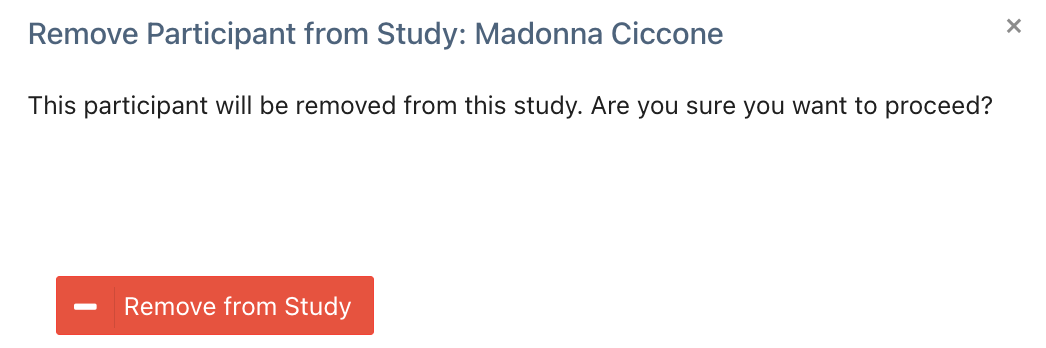
- A confirmation modal will appear
- Click Remove From Study
- Confirm Removal
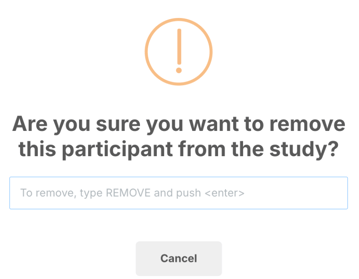
- A second confirmation modal will appear
- Type REMOVE to confirm
- Complete the action
What Happens After Removal
- The participant will no longer appear in that study’s participant list
- The participant’s GLOBAL Registry profile remains unchanged
- The participant may still appear:
- In the Registry
- In other studies, if applicable
- All study-specific data tied to that study is removed
Important: Registry vs. Study Data
Removing a participant from a study does not delete the participant from EnrollNow.
If you need to remove the participant entirely:
- This must be done separately from the Registry
- Use caution, especially if the participant is associated with multiple studies
Best Practices
Before proceeding, confirm:
- You have selected the correct participant
- The participant no longer needs to be included in the study
- Any necessary data has been reviewed or exported
Need Help?
If you’re unsure whether removing a participant is the correct action, or need assistance verifying whether they are associated with other studies, please contact the EnrollNow team at help@enrollnow.io.