
Automated text templates allow research teams to schedule messages based on study events or date variables in EnrollNow. These messages can be triggered by scheduled or completed events, or by specific date-based variables such as:
-
Last Contact Date
-
Birthday
-
Date of Enrollment
-
Any custom date variable
Once the template is created, any participant who meets the criteria will receive the text message at the selected interval.
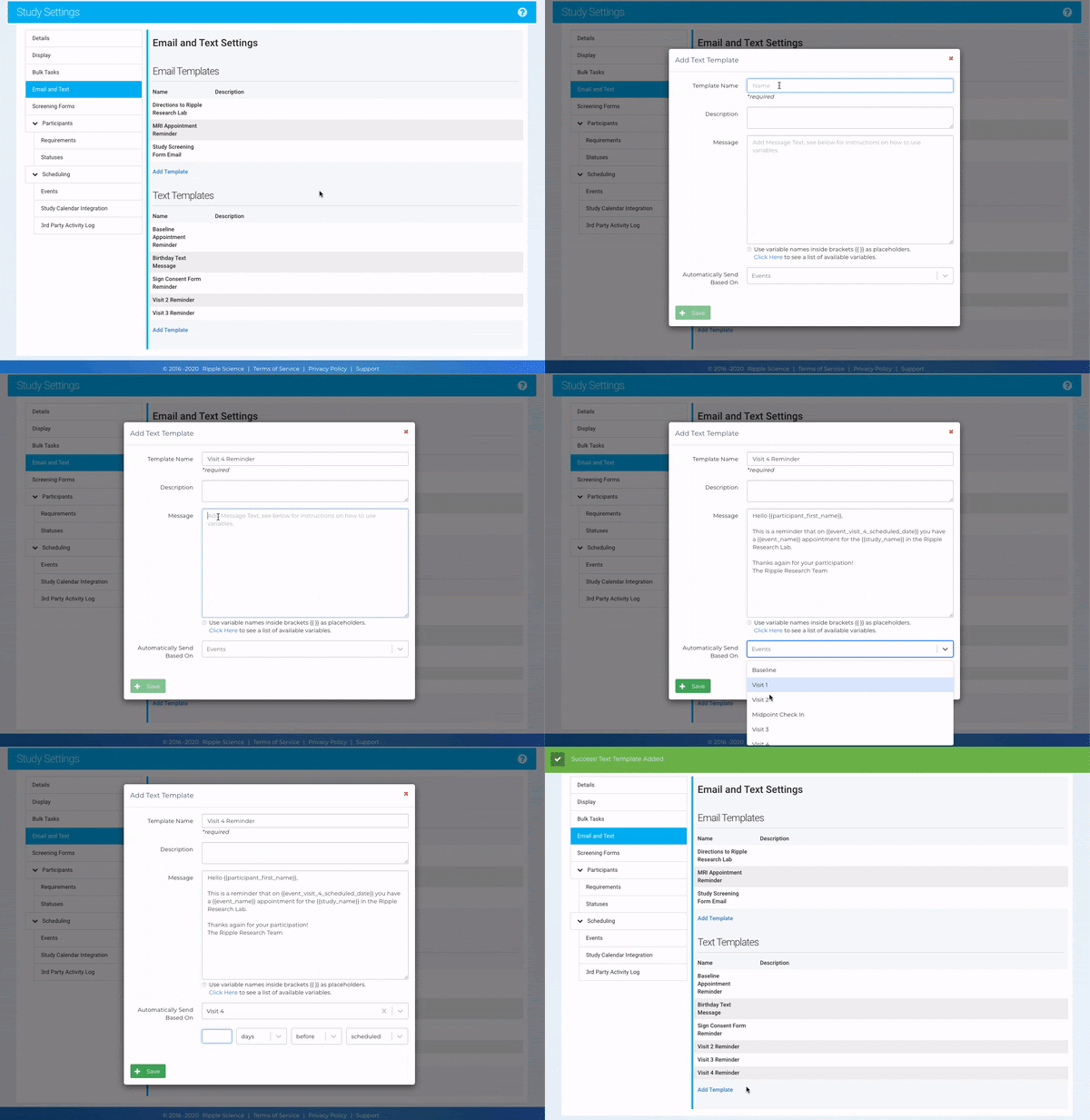
How to Set Up Automated Text Messaging
1. Create a New Template
-
-
- Click “Add Template” in the Email & Text section of Study Settings.
-
2. Enter Template Details
-
-
Template Name – Provide a clear, descriptive name for the message.
- Description- Outline the purpose of the text message
- Message Content-Create the text message
-
3. Set the Trigger as either Event-based or Date-based Variable
Choose when the message should be sent, such as:
-
- Scheduled study event set to either before or after event (e.g., appointment reminders)
-
- Completion of an event set to after the event(e.g., follow-up instructions)
- Based on any Date-Based Variables set to before or after the date (birthdates, date enrolled in study, etc.)
- Completion of an event set to after the event(e.g., follow-up instructions)
4. Set the Timing for Message Delivery
-
-
- Specify when the message should be sent relative to the event or date variable. (2 days before, 4 days after, etc.)
- Text will be delivered 9:00am local time on the day specified.
-
5. Save and Activate
-
-
- Click “Save” to finalize the template.
-

NOTE: Refer to this article for more information on the limitations of texting.
How to Confirm a Text Message Was Sent
- Once a text message is sent, a log entry is created in the Text Log on the participant’s profile card.
- This log serves as a record of communication for tracking and compliance.
How the Recipient’s Phone Number Is Selected
EnrollNow follows a hierarchy to determine which phone number receives the automated text message:
-
Preferred Phone Number of the Preferred Contact (if available).
-
If the preferred contact does not have a preferred phone number, the system will use the first, non-archived phone number listed for the preferred contact.
-
If no preferred contact exists, or their phone number is unavailable, the system will send the message to the preferred phone number of the participant.
-
If the participant does not have a preferred phone number, EnrollNow will use the first, non-archived phone number from the participant’s contact list.
-
If the participant’s contact is archived or has no phone number, the automated text message will not be sent.
Compliance Considerations for Automated Text Messaging
The use of text messaging for participant or patient communication in research is often regulated by institutional policies and must comply with ethical and security standards. These regulations are typically overseen by the Institutional Review Board (IRB) and the Information Security Compliance Office. Confirm authorization to text before using this feature.
Before Using Automated Text Messaging, Ensure the Following:
IRB Approval – Confirm that your study protocol allows for text-based communication with participants.
Institutional Authorization – Verify that texting is permitted under your institution’s data security policies.
Participant Consent – Obtain documented consent from participants before sending study-related text messages.
HIPAA & Data Privacy Compliance – Ensure that protected health information (PHI) is not disclosed in messages unless explicitly permitted.
Only proceed with automated texting after confirming that your study meets all compliance requirements. If in doubt, consult your institution’s IRB or compliance office before enabling this feature.
Best Practices for Ensuring Message Delivery
✅ Verify that each participant’s preferred CELL phone number is correctly recorded.
✅ Regularly update participant and contact phone records to prevent missed messages.