
Text Messaging Capabilities
Depending on your EnrollNow subscription and site configuration, texting capabilities may include:
- Sending individual text messages from a participant’s profile
- Creating reusable Text Templates
- Personalizing messages with supported participant and study information
- Sending automated text messages based on study Events or other supported triggers
- Viewing sent messages in the participant’s Text log
- Configuring a default automated reply for incoming participant responses
Common Uses for Text Messaging
Study teams may use text messages for:
- Appointment and visit reminders
- Study instructions and updates
- Follow-up communication
- Participant engagement
- Recruitment and retention outreach
- Time-sensitive reminders
Text Templates
Study Admins can create reusable Text Templates to help teams send consistent messages more efficiently. For more information on how to create a text message, refer to this article.
Templates may include supported personalized information, such as:
- Participant name
- Study name
- Upcoming appointment details
- Other available merge fields
Text Templates can reduce repetitive data entry and help ensure commonly used messages remain consistent.
Automated Text Messaging
Automated Messaging allows teams to configure text messages that are sent when specified conditions are met. More details on how to set up automated texting can be found in this article.
Automated text messages may be triggered by:
- A scheduled study Event
- The completion of a study Event
- Participant or study information stored in EnrollNow
- Other supported automated messaging triggers
Automated messages are configured under Study Settings in the Email & Text section.
Text Log
All text messages sent through EnrollNow are recorded in the participant’s Text log.
The Text log may include:
- The date and time the message was sent
- The message content
- The recipient
- The user or automated process that sent the message
Participant Replies
Text messaging in EnrollNow is primarily designed for outbound communication. Participants cannot use the incoming text thread to communicate directly with study staff.
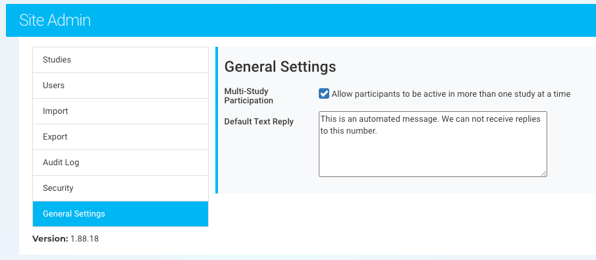
If a participant replies to an EnrollNow text message, they receive the site’s configured default response. A Site Admin can customize this default reply message under General Settings in the Site Admin tab.
IMPORTANT CONSIDERATIONS:
The default reply applies to participants across the entire EnrollNow site. Because the same response is used for all studies, it should be written as a general site-level message rather than referencing a specific study.
The default reply may include general instructions about how participants should contact the study team if they need assistance or would like to respond.
Availability
Text messaging is available only for EnrollNow subscriptions that include this feature. Contact your Customer Success Manager if you are unsure whether texting is included with your subscription.
For step-by-step instructions, refer to the Sending a Text Message to a Participant in EnrollNow article.
Text Messaging Compliance
The use of text messaging to communicate with research participants or patients may be regulated by your institution’s policies and applicable requirements. These policies are often overseen by departments such as:
- The Institutional Review Board (IRB)
- The Information Security or Compliance Office
Important: Before using text messaging in EnrollNow, confirm that your team has the appropriate authorization and participant consent to communicate by text. Your organization is responsible for ensuring that its messaging practices comply with applicable regulations, institutional policies, and approved study protocols.