
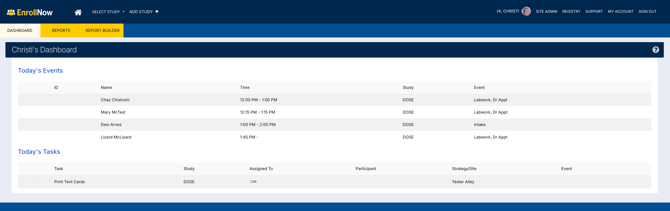
The User Homepage Dashboard in EnrollNow provides a centralized overview of daily study activities and tasks. The dashboard helps users efficiently manage Events and Tasks across all studies they have access to, reducing the need to navigate between multiple study dashboards.
The homepage serves as a daily workspace for monitoring participant activity, upcoming appointments, and outstanding responsibilities.
Accessing the User Homepage Dashboard
Users can access the User Homepage Dashboard at any time by clicking the Home icon located in the upper-left corner of the navigation bar. The homepage is available to all user roles. The dashboard provides a summary of all Events and Tasks scheduled for the current day, helping users prioritize daily responsibilities and participant engagement activities.
Multi-Study Integration
The User Homepage Dashboard compiles information across all studies the logged-in user has permission to access.
This centralized view:
- Reduces the need to switch between study dashboards
- Improves operational efficiency
- Helps users monitor activities across multiple studies from one location
Dashboard Sections
Today's Events
The Today's Events section displays a compiled list of participant events occurring on the current day.
This includes:
- Events assigned to the logged-in user
- Unassigned events across all accessible studies
Selecting an event redirects the user directly to the participant profile and corresponding study.
Event Management Benefits
- Quickly identify upcoming participant visits
- Monitor unassigned study activities
- Navigate directly to participant records for follow-up actions
Today's Tasks
The Today's Tasks section displays all tasks due on the current day.
This includes:
- Tasks assigned to the logged-in user
- Unassigned tasks across all accessible studies
Users can:
- Mark tasks as complete directly from the homepage
- Select a task to navigate to the associated study and task details
Task Management Benefits
- Track outstanding study responsibilities
- Improve daily workflow organization
- Maintain timely participant follow-up and study coordination
Best Practices for Using the User Homepage Dashboard
To maximize efficiency when using the User Homepage Dashboard:
- Check the dashboard daily for upcoming Events and pending Tasks
- Review unassigned activities regularly to ensure study coverage
- Use task prioritization to stay on top of deadlines and participant engagement
- Mark completed tasks promptly to maintain accurate study workflows
- Use direct navigation links to quickly access participant profiles and study details