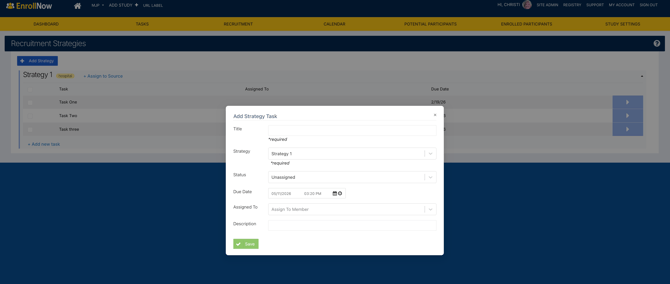
Recruitment Strategies in EnrollNow allow study teams to track how participants were recruited into a study. By identifying the outreach methods and recruitment activities used to reach participants, teams can better understand which strategies are generating interest, contributing to enrollment, and supporting their recruitment goals.
Strategies can be used independently or alongside Recruitment Sources and Sites to provide a more complete picture of your recruitment efforts.
Using Recruitment Strategies can help your team:
- Identify which recruitment methods are attracting participants.
- Compare the effectiveness of outreach activities such as flyers, email campaigns, and social media advertisements.
- Track which strategies are contributing to participant enrollment.
- Evaluate recruitment performance using the Study Dashboard and Report Builder.
- Make informed decisions about future recruitment activities and resources.
Recruitment Strategies are optional and can be configured based on the level of detail your study team wants to track.
Understanding Recruitment Strategies
A Recruitment Strategy identifies the specific method or outreach activity used to recruit a participant.
Common examples include:
- Flyer: Printed materials distributed at clinics, schools, or community locations.
- Email Blast: Recruitment emails sent to potential participants.
- Social Media Ad: Advertisements shared through social media platforms.
- QR Code: QR codes used on recruitment materials to direct participants to study information or interest forms.
- In-Person Presentation: Recruitment presentations at clinics, schools, or community events.
- Provider Outreach: Recruitment efforts conducted through healthcare providers or research partners.
- Community Event: Outreach conducted at health fairs or other community activities.
- Registry Outreach: Recruitment communications sent to individuals in an existing research registry.
Unlike Recruitment Sources and Sites, which identify where a participant came from, Recruitment Strategies identify how the participant was recruited.
How Strategies Work with Sources and Sites
Recruitment Strategies are standalone and are not assigned to a specific Source or Site during setup. This means the same Strategy can be used across multiple recruitment locations or pathways.
For example, your team may use the Strategy Flyer at several locations:
| Source | Site | Strategy |
|---|---|---|
| Clinics | Dr. A Clinic | Flyer |
| Clinics | Dr. B Clinic | Flyer |
| Community Organizations | Community Center | Flyer |
| Schools | Lincoln Elementary School | Flyer |
In this example, the Strategy remains the same, but the Source and Site identify where the flyer was distributed.
By combining these fields, your team can evaluate both where participants are coming from and which outreach methods are most effective.
Creating Recruitment Strategies
Recruitment Strategies are configured individually for each study in EnrollNow.
To add a Recruitment Strategy:
- Select the Recruitment tab.
- Select Strategies from the drop-down.
- Click + Add Strategy.
- Name they Strategy.
- Assign to a Source (optional).
- Save your changes.
Repeat these steps for each additional Strategy your team plans to use.
Important
Recruitment Strategies are independent of Sources and Sites, allowing you to create and manage them separately. You can create all your recruitment Strategies first and then associate them with the appropriate Sources once your Recruitment Sources have been created.
This flexibility allows your team to organize recruitment methods and use them across multiple recruitment pathways as needed.
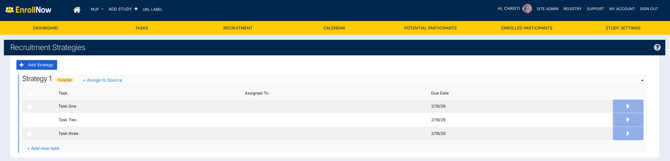
Key Features:
- Users can create and assign tasks for each recruitment strategy.
- Tasks include setting due dates and allocating responsibilities to team members.
- Assigned tasks appear in the My Tasks section under the Task tab for easy tracking.
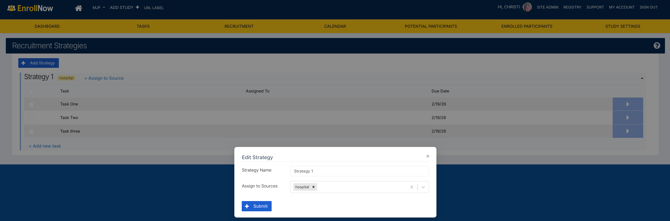
Instructions for Assigning a Source:
- Click +Assign a Source.
- Select the desired source for the strategy (Required).
- Click Submit to complete the process.
Instructions for Adding a Task:
- Click +Add New Task.
- Enter the Title of the task (Required).
- Select a strategy from the dropdown menu.
- Assign a Status.
- Set a Due Date.
- Assign the task to a Staff Member from the dropdown menu.
- Add a brief description (optional).
- Click Save.
This structured approach ensures efficient recruitment strategy execution and task management.