
The EnrollNow Dashboard provides a centralized, real-time view of each study’s recruitment performance and participant demographics. It brings together key metrics and visualizations to help your team quickly understand enrollment progress, evaluate recruitment effectiveness, and make informed, data-driven decisions to optimize study outcomes.
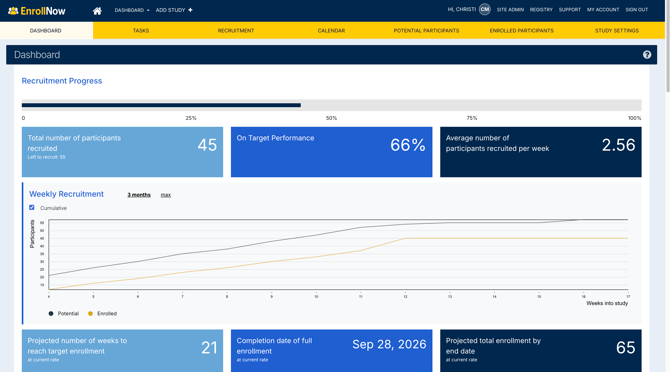
Through the Dashboard, you can monitor overall enrollment progress, analyze weekly recruitment trends, review forecasting metrics, evaluate which sources and strategies are driving participation, and assess demographic representation within your study population. All data is standardized and reflects participants in Potential and Enrolled statuses, ensuring consistent reporting across studies.
To ensure accurate insights, it is important that core study settings—such as recruitment dates, sample size, and recruitment configurations—are properly set up within Study Settings.
For a deeper dive into each section of the Dashboard, refer to the following articles:
- Dashboard: Recruitment Progress Section
- Dashboard: Weekly Recruitment Trends & Forecasting
- Dashboard: Participants by Source, Site & Strategy
- Dashboard: Overall Enrollment Summary
- Dashboard: Demographic Insights
- Dashboard: Viewing & Exporting Data
These articles provide detailed guidance on how to interpret each section and use the Dashboard effectively to support your recruitment goals.